
Agent
Agent configuration for Crow CI workers.
Minimum Configuration
Section titled “Minimum Configuration”| Variable | Description |
|---|---|
CROW_SERVER | Server gRPC address (no protocol prefix) |
CROW_AGENT_SECRET | Authentication token from server |
Parallel Workflows
Section titled “Parallel Workflows”By default, agents execute one workflow at a time. Increase based on available resources.
Single-Use Agents
Section titled “Single-Use Agents”CROW_MAX_WORKFLOWS caps how many workflows an agent runs at once.
CROW_AGENT_MAX_LIFETIME_WORKFLOWS caps how many it runs in total: once the budget is used up the agent stops polling, waits for what it is still running, unregisters and exits with status 0.
The default of 0 keeps the usual behaviour, where an agent serves workflows until it is stopped.
This is the ephemeral-runner model: a value of 1 gives every job a machine that has never run anyone else’s pipeline.
It is what a public instance needs, because an agent host is otherwise reused between workflows, and whatever a pull request from a stranger leaves behind — a poisoned build cache, a background process, a modified toolchain — is still there for the next repository’s job.
Details worth knowing:
- Waiting for work costs nothing: an agent that polls an empty queue for an hour still has its full budget when a workflow finally arrives.
CROW_MAX_WORKFLOWSis capped at the lifetime budget, since an agent that retires after one workflow can never use more than one slot.- A workflow adopted from a previous agent on the same machine is charged against the budget. Its containers already ran there, which is the contamination the budget is counting.
Whether the agent disappears from the server on retirement depends on how it registered:
| Registration | On retirement |
|---|---|
Shared secret (CROW_AGENT_SECRET, a system agent) | The server deletes the agent. |
| Individual agent token, as created by the autoscaler or by an org | The server keeps the record; whoever created the agent is responsible for removing it. |
In both cases the process stops polling and exits 0.
If the machines come from the autoscaler, pair the lifetime budget with a provider that gives each agent its own VM, and note that the autoscaler currently reclaims a retired agent only after CROW_AGENT_IDLE_TIMEOUT rather than as soon as it exits.
Workflow Filtering
Section titled “Workflow Filtering”Crow routes workflows to agents using two mechanisms:
| Method | Description |
|---|---|
| Labels | Filter by matching key-value pairs |
| Priority | Prefer agents with higher priority when multiple match |
Labels
Section titled “Labels”Agents have built-in labels:
| Label | Description |
|---|---|
backend | Execution backend (docker, kubernetes, local, podman, tart) |
type | Agent type |
platform | OS/architecture |
agent | Agent identifier |
Add custom labels to route specific workflows:
Only agents with matching labels will process workflows with those labels.
Priority
Section titled “Priority”When multiple agents match, higher priority agents are preferred. Priority is managed server-side per agent in the web UI (agent settings) or via the API, and persists across agent and server restarts. Priority is honored in both single-instance and High Availability deployments.
Scheduling strategy
Section titled “Scheduling strategy”Labels and priority narrow the set of eligible agents.
When several agents remain eligible (matching labels, tied on the highest priority), the server picks one according to the CROW_SCHEDULING_STRATEGY server setting:
| Strategy | Behavior |
|---|---|
least-loaded | Assign to the agent with the lowest current load (running workflows relative to its slots). Default. |
pack | Concentrate work on the fewest agents by filling the busiest agent that still has a free slot first. |
round-robin | Cycle through eligible agents in a stable order, ignoring current load. |
random | Pick a uniformly random eligible agent. |
least-loaded spreads builds evenly and is the best default for even utilization.
pack pairs well with the autoscaler: keeping idle agents empty lets them be scaled down.
An agent’s number of slots is its parallel workflow capacity, so load balancing scales proportionally to each agent’s capacity.
Agent Types
Section titled “Agent Types”Global Agents
Section titled “Global Agents”Admin-managed agents that process all workflows. Configure via environment variables on the agent.
System Agents (shared secret)
Section titled “System Agents (shared secret)”Agents that authenticate with the shared CROW_AGENT_SECRET register as system agents and are labeled System in the admin agent list.
They share a single token, so the server identifies them by hostname.
On reconnect, a system agent re-binds to its existing row using its hostname instead of creating a new one.
This keeps a restarted agent (for example, a container without persistent agent-config) visible under one stable entry rather than accumulating orphaned rows.
Agents configured with a per-agent token always bind to their pre-created row by token, regardless of hostname.
Organization/User Agents
Section titled “Organization/User Agents”Non-admin users can register agents scoped to their org or user account.
Remote agent configuration:
Multi-Org Agents
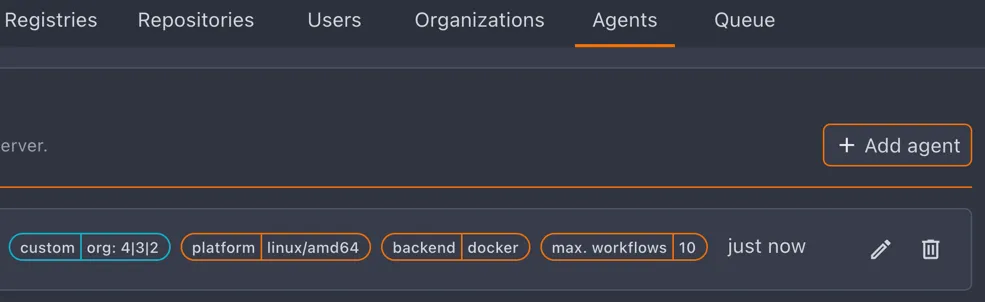
Section titled “Multi-Org Agents”Process workflows from multiple specified organizations or repositories.
Multi-org labels appear highlighted in the agent list:
Agent Scope
Section titled “Agent Scope”Admins choose an agent’s scope in the Add agent dialog. Global (the default) lets the agent run pipelines for any organization. Specific organizations scopes the agent to one or more selected orgs.
Org admins can manage agents scoped to their organization from the org’s agent settings page. Deleting a multi-org agent there removes it from that organization only; it is fully deleted when that was its last remaining organization.
Reported Host Resources
Section titled “Reported Host Resources”Agents report the CPU core count and total memory of the machine that runs their workloads.
The agent list and the agent detail page show these totals next to the per-workflow limits, so a limit like 4 GB / 64 GB reads as “4 GB per workflow on a 64 GB host”.
The numbers describe the workload host, not the agent process. An agent that drives a remote Docker daemon reports the daemon’s machine.
| Backend | Reported |
|---|---|
| docker | cores and memory of the Docker daemon host |
| podman | cores and memory of the Podman host |
| local | cores everywhere, memory on Linux only |
| kubernetes | nothing, since workloads are spread across nodes |
Values are read once when the agent starts and refreshed whenever it re-registers. Agents older than the server simply report nothing, and the totals stay hidden for them.
Backend Options
Section titled “Backend Options”Configure backend-specific settings at the agent level. See environment variables for all CROW_BACKEND_* options.
Local Backend Sandboxing
Section titled “Local Backend Sandboxing”Enable process isolation using macOS sandbox-exec:
| Level | Network | System Access | Use Case |
|---|---|---|---|
none | ✅ Full | ✅ Full | Trusted code only |
standard | ✅ Full | ⚠️ Limited | Most CI/CD workloads |
strict | ❌ Blocked | ❌ Minimal | Offline builds, maximum isolation |
Standard level details:
| Allows | Denies |
|---|---|
| Network access (npm, go get, pip) | Another workflow’s directories on the same agent |
| System libraries and frameworks | Writing anywhere outside the allowed directories |
The workflow’s own directories, including $TMPDIR | Sensitive user dirs (Documents, Desktop) |
| Shared build caches and the account’s temp dir | SSH private keys |
| Shell configs (.bashrc, .zshrc) | The agent’s own environment and credentials |
none runs processes without isolation. Only use with fully trusted code.