
Repository Settings
The owner of a repository in the linked forge can change the related Crow CI settings via the web interface.
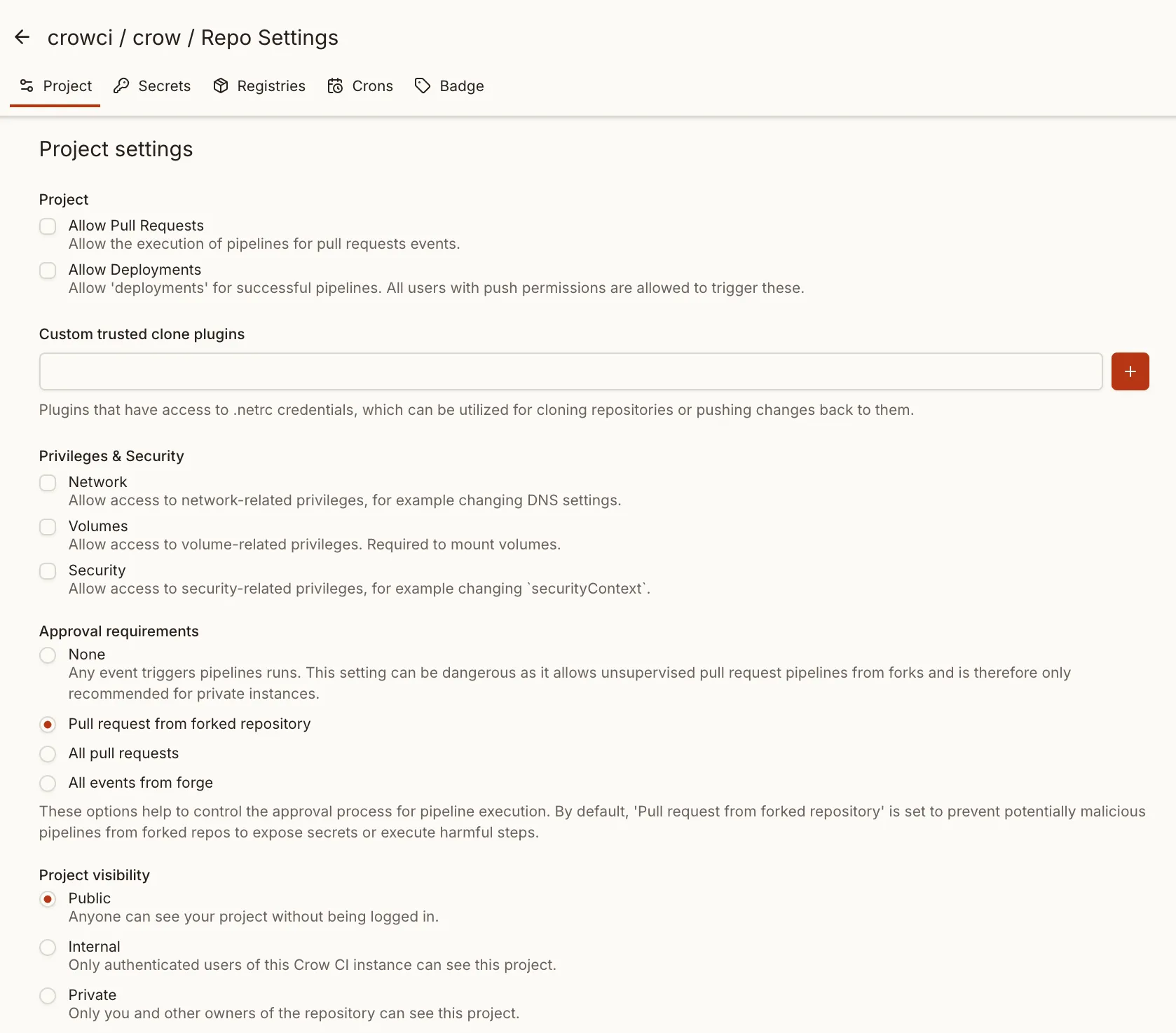
General
Section titled “General”Allow pull requests
Section titled “Allow pull requests”When enabled, webhooks for pull request events are issued. If disabled, no pipelines will be triggered for PR events.
Allow deployments
Section titled “Allow deployments”When enabled, pipelines can be started via “deployment” events. This includes both webhook triggers from forges for this event and the use of the “deployment” button in the Crow CI UI, which is shown when all steps of a pipelines succeeded.
By default, any user with “push” (write) access to the repository can trigger deployments.
Restrict to team
Section titled “Restrict to team”For stricter access control, you can restrict deployments to members of a specific forge team:
-
Enable deployments
Check the Deployments option (see above)
-
Set the team restriction
In the Restrict to Team field, enter the team name (e.g.,
crowci-deploy-team)
When configured:
- Only members of the specified team can trigger deployments
- Team membership is verified against the forge at deployment time
- Instance admins do not bypass this check—team membership is always required
See the Deployment documentation for more details on permissions.
Custom trusted clone plugins
Section titled “Custom trusted clone plugins”During the clone process, sometimes Git credentials (e.g., for private repositories) are required. These credentials are provided via netrc.
They are injected only into “trusted” plugins, specified in the environment variable CROW_PLUGINS_TRUSTED_CLONE (an instance-wide server setting) or declared in this repository-level setting.
With these credentials, it is possible to perform arbitrary Git operations, including pushing changes back to the repo. To prevent unauthorized access or misuse, a plugin allowlist is required, either on the instance level or the repository level. Without such, a malicious contributor could use a custom clone plugin in a pull request to reveal or transfer these credentials.
Privileges & Security
Section titled “Privileges & Security”These settings give the underlying containers access to escalated capabilities which refer to common container capabilities defined in the docker/docker “Config” type.
Network
Section titled “Network”With the network privilege, containers are given the following capabilities:
- DNS
- DNS search
- ExtraHosts
- NetworkMode
The underlying config object is defined in the docker/docker network “EndPointSettings” type.
Volumes
Section titled “Volumes”With the volumes privilege, containers are given the following capabilities:
- Volumes
- Devices (undocumented)
- Tmpfs (undocumented)
The underlying config object is defined in the docker/docker volumes “VolumeCreate” type.
Security
Section titled “Security”With the security privilege, containers are given the following capabilities:
Approval requirements
Section titled “Approval requirements”To prevent malicious pipelines from extracting secrets or running harmful commands, pipelines can be configured to require approval before starting. The default setting is to require approvals for forked repositories, assuming that all people with “write” access to the repository are trusted by default.
Project visibility
Section titled “Project visibility”This setting defines who can access the project. A user with access to a project can see all builds and their respective logs and artifacts. Settings, Secrets and Registries can only be seen by owners.
Public: Every user can see your project, without being logged in.Internal: Only authenticated users of the CrowCI instance can see the project.Private: Only you (and other owners) of the repository can see the project.
Timeout
Section titled “Timeout”If the pipeline has not finished within the timeout, it will be treated as timed out (and terminated).
Cancel previous pipelines
Section titled “Cancel previous pipelines”This option defines whether previous pipelines of the same event and context should be canceled before starting the newly triggered one.
Log retention
Section titled “Log retention”These settings determine for how long the step logs of pipelines are being stored. By default, logs are stored for 90 days, no matter how many pipelines were run.
The purging is happening on each pipeline run and not on schedule. This means, if a pipeline has been run 95 days ago and there was no pipeline within the last 5 days, the logs are still there and will be purged at the start of the next run.
If both options have valid values, they will be merged to determine which logs to purge.
Once logs are purged, an indicator is set on the corresponding pipeline, ensuring that the purge process will not run again unnecessarily in future executions.
Footnotes
Section titled “Footnotes”-
Only applies to the Kubernetes backend. See the official documentation for “securityContext”. ↩
-
Running a container as “privileged” gives excessive capabilities and is not recommended for normal steps. ↩